
5.3 How to respond to enquiries
Turn an introduction into a productive conversation
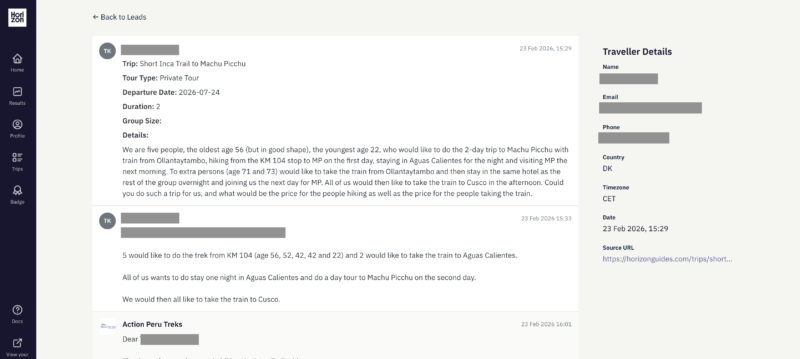
Click a traveller's name on the Results page to open their enquiry. Everything for that traveller sits on a single screen — a little like a lightweight CRM record.
The enquiry view
Across the top, a progress bar shows the enquiry's current stage — Incoming, Active, Won or Lost — so you always know where things stand.
On the right, the Summary panel gathers the key facts: the trip they enquired about, tour type, departure date, duration, group size, when the enquiry arrived, and where it came from. Below it, Traveller details shows their name and contact information. (Depending on your plan, a traveller's email and phone may unlock once you send your first reply.)
The main column is the conversation. The traveller's original request appears as the first message, followed by any earlier correspondence with the Horizon Guides team. A reply box sits underneath, ready to go — for new enquiries it opens automatically, so you can start typing straight away.
Sending a reply
Write your message and select Send. Your reply goes to the traveller, and the enquiry moves to your Active tab.
Attaching documents
You can attach a file to a message — a PDF or Word document, up to 10MB each — using the Attach button beneath the reply box, or by dragging a file straight onto it. It's useful for sharing a draft itinerary, a quote, or a brochure once the conversation is underway.
One note on timing: keep your very first reply short and link-free. Some email providers treat first-contact messages containing links or attachments as spam. Send a brief acknowledgement first to introduce yourself, then share itineraries, quotes and attachments once you're in conversation — either through the messaging system or from your own email.
The best responses treat an enquiry as the start of a conversation, not simply a sales opportunity.
Travellers come to Horizon Guides because they value independent expertise and want to speak with real specialists. Often they are still exploring their plans and looking for guidance as much as a specific itinerary.
Your first response should acknowledge the enquiry, answer any initial questions, and help clarify what the traveller is looking for. Taking the time to understand their plans before proposing a trip usually leads to better conversations and stronger bookings.
You’re welcome to use AI tools to polish your responses, especially if you’re translating into English. However, copy-and-paste AI responses are not appropriate. Travellers want to hear your personal advice and recommendations as the expert.
Your best interactions with travellers may also be anonymised and published on your public profile or within Horizon Guides content. The more useful contributions you make, the more visible your expertise becomes across the platform.
Best practice for successful responses
Reply promptly
Travellers are usually still in the planning phase when they enquire. A quick response, ideally the same day, helps keep the momentum of the conversation.
Send a short acknowledgement first
Reply initially through the Horizon Guides messaging system to acknowledge the enquiry, answer any immediate questions, and introduce yourself.
Avoid links in your first message
Some email services treat messages with external links as spam when they come from another domain. A short acknowledgement first helps avoid this and lets the traveller know to expect an email from you.
Send a longer message from your own email
Once you’ve clarified the request, you can follow up from your own email with links to itineraries, reviews, attachments, or other useful information.
Ask questions before proposing an itinerary
Many travellers are still exploring options. Take time to understand what they are looking for before suggesting specific tours.
Help first, sell later
Honest advice and thoughtful suggestions build trust and lead to better conversations.
Offer a call if it helps
Travellers value speaking with real specialists. A short WhatsApp or Zoom conversation can quickly clarify plans and move things forward.