
3.1 Creating & editing trip listings
How to create & manage your trips
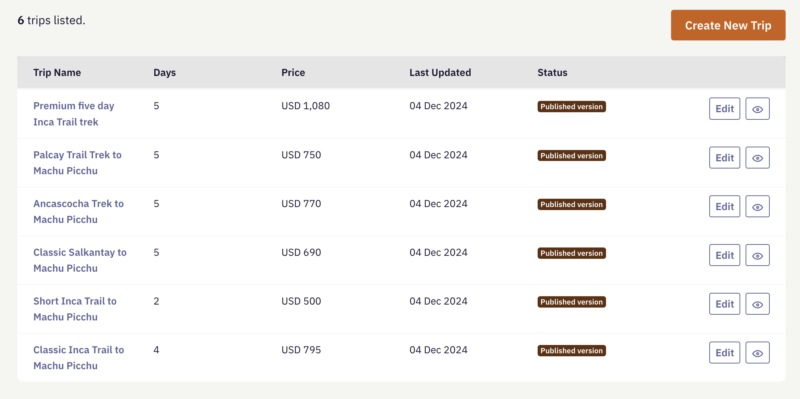
Each trip listing represents a specific itinerary or experience that travellers can enquire about. Clear, well-presented trips help people quickly understand what you offer and decide whether to get in touch.
To add a new trip, go to Listings in the partner admin and select Create New Trip. You'll see a form with several fields describing the trip — complete them all to create your listing.
You’ll see a form with several fields describing the trip. Complete all fields to create your listing. Most fields are self-explanatory, but play closer attention to the following:
Tagline
A short sentence describing the trip.
Keep this clear and descriptive rather than promotional. The aim is to quickly explain what the experience involves.
Examples:
Explore Kakadu’s wetlands, waterfalls and Aboriginal heritage sites
A two-day wildlife and cultural journey through Litchfield National Park
Trekking through remote valleys in the Pamir Mountains
Avoid overly promotional phrases such as “the ultimate adventure” or “a once-in-a-lifetime experience”. Let the destination and experience speak for themselves.
Overview
This is the main description of the trip.
Use this space to give travellers a clear sense of the experience. A few concise paragraphs are usually enough.
You might include:
A short overview of the itinerary
The main places or highlights
What makes the experience distinctive
Any key details travellers should know
Focus on helping travellers understand what the trip involves rather than trying to “sell” it.
Trip Photo
Upload a representative image for the trip.
The best photos show clients experiencing the destination, for example:
Guests exploring the landscape
Wildlife encounters
Cultural experiences
Key locations featured in the itinerary
Images that show people enjoying the experience often help travellers picture themselves on the trip.
As with all images on Horizon Guides, you must have the right to use the photo and ensure you hold the appropriate copyright or usage permissions.
Editing published trips
You can edit any trip at any time: go to Listings and select Edit next to the trip you want to update. The form is the same as when you created it.
Showing and hiding trips
Your Listings page shows the status of each trip — Published version (live on your profile), Hidden (not currently shown), or Under Review (a change waiting to be approved).
To take a trip off your profile, select Hide next to it; to bring it back, select Show. Hiding a trip doesn't delete it — it simply removes it from your public profile until you're ready to show it again.
After submitting/editing a trip
New or edited trips are reviewed before they appear on Horizon Guides. When approved, they will become visible to travellers browsing relevant destinations and experiences.